
Trusted ERP Solutions Provider To Small, Medium and Large Enterprises
Ultimate Guide to Different Types of IT Support
What is ERP for a Trading Business?

Saeeda Riaz – Partner,
AGN IT Services LLC | Strategic IT Partner of 10+ Enterprises
I hope you find this blog post insightful. If you’d like our team to handle technology in your business and bring the best ROI, click here.
I hope you find this blog post insightful. If you’d like our team to handle technology in your business and bring the best ROI, click here.
In today’s competitive world of trading businesses, operational efficiency is critical. Enterprise Resource Planning (ERP) systems play a very important and pivotal role by centralizing inventory management, order processing, procurement, and financial reporting. In this blog you will discover the key features and benefits of ERP solutions tailored specifically for trading companies.
What is ERP for Trading Business? Key Features & Benefits
A Practical Look at ERP in Trading
In the trading business, managing everything from sales and stock to finance and supply chains is no small task. Things move quickly, and one small mistake can delay the entire process. This is where ERP systems come into play. Instead of using separate tools for every department, ERP brings everything together in one place—making it easier to control and manage.
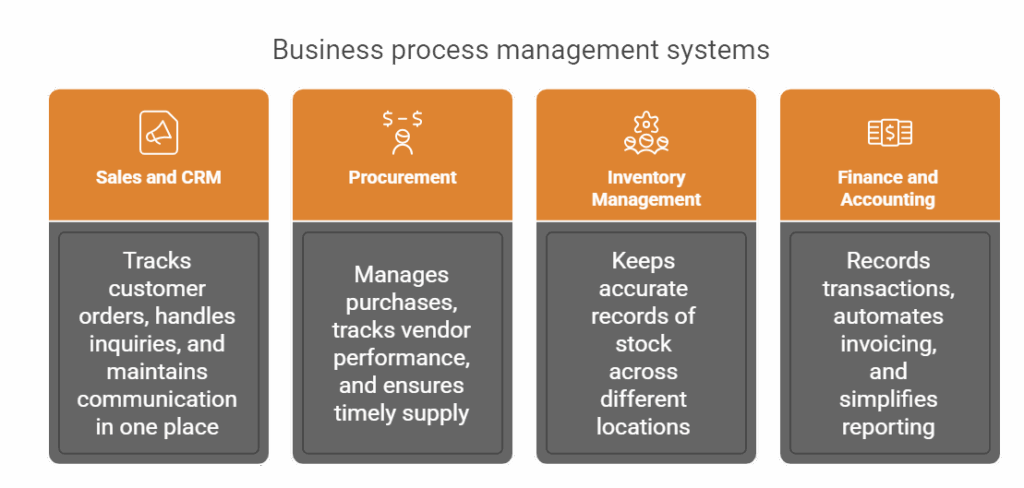
ERP, short for Enterprise Resource Planning, works as a single system that links all core functions of a trading business. It’s not just about automating tasks; it’s about gaining a clear, real-time view of operations. Here’s how ERP supports trading:
Sales and CRM: Tracks customer orders, handles inquiries, and maintains communication in one place. Read more
Procurement: Manages purchases, tracks vendor performance, and ensures timely supply
Inventory Management: Keeps accurate records of stock across different locations.
Finance and Accounting: Records transactions, automates invoicing, and simplifies reporting Read more
Supply Chain and Distribution: Connects warehouse, logistics, and delivery systems
Businesses that rely on manual processes often face delays, human errors, and poor visibility across departments. These problems can lead to lost sales, unsatisfied customers, and increased costs. An ERP software for trading company
helps reduce these risks by providing structured workflows, better data, and automation.
Trading companies dealing with multiple products, suppliers, and customers across locations especially benefit from ERP. It brings consistency, reduces duplication of work, and ensures that decision-makers have access to updated information when needed.
Adopting ERP is not just about technology—it’s about building a stronger, more organized business foundation. When properly used, ERP supports smoother daily operations and long-term business growth. In the following sections, we’ll break down the origins of ERP, how it works specifically in trading, and the different modules that make up a complete ERP system.
Why is Enterprise Resource Planning Important?
In trading, multiple activities are happening at once—orders coming in, payments being processed, stock being updated, and deliveries being made. Without a system in place, managing all these tasks can quickly become confusing and error-prone.
ERP software steps in to reduce this confusion. It gives companies one central place to store and access information. This means:
Less time spent on manual data entry
Lower chances of human error
Faster processing of orders and invoices
Clear visibility across departments
Better customer service through quick response and updates
For example, when a sales order is entered into the ERP system, the inventory team can immediately see it and check stock availability. The finance team can then issue the invoice, and the delivery team can prepare the shipment. All this happens in one system, with no back-and-forth emails or spreadsheets needed.
ERP also helps businesses follow compliance and reporting standards. With financial data updated in real-time, companies can generate reports quickly, prepare for audits, and ensure that they meet industry regulations.
Another major benefit is decision-making. Since the ERP system collects and shows data from all departments, leaders can see what’s working and what needs attention. This helps in planning, budgeting, and setting realistic goals for growth.
Overall, ERP isn’t just software, it’s a business tool that supports smooth operations, improves efficiency, and strengthens the ability to serve customers better in the trading industry.
ERP Examples by Industry
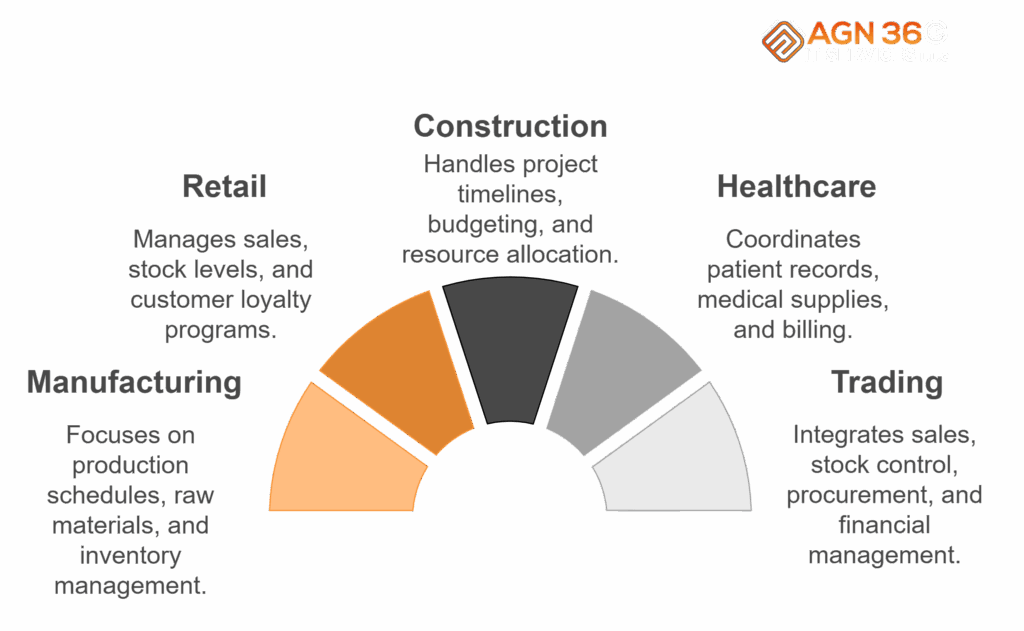
While ERP systems are used across many sectors, they work differently depending on the type of business. Here’s how ERP is commonly applied in different industries:
Manufacturing: Tracks production schedules, raw materials, and inventory
Retail: Manages sales, stock levels, and customer loyalty programs
Construction: Handles project timelines, budgeting, and resource allocation
Healthcare: Coordinates patient records, inventory of medical supplies, and billing
Trading: Integrates sales, stock control, procurement, and financial management
ERP software for trading companies is especially valuable. They bring together various moving parts like vendors, products, pricing, taxes, and shipping. A good ERP system in trading helps businesses
Control multiple warehouses or stores
Track goods across locations in real-time
Process purchase and sales orders efficiently
How to Maintain Accurate Stock Level and How Do ERP Systems Work in Trading Businesses?
In the trading business, things move quickly—orders are placed, goods are received, and deliveries are made every day. Without a structured system, managing these daily tasks can become overwhelming. This is where ERP systems play a major role. They act as a central control system, linking together all departments so that operations run smoothly and information flows without delays.
Here’s how ERP works in a trading environment:
Sales team enters customer orders directly into the system
The inventory module checks stock levels and confirms availability
If stock is low, the procurement module automatically creates a purchase order
Once goods are received, the warehouse updates the system in real-time
The finance team gets notified to generate an invoice and track payments
Supply chain and logistics ensure timely delivery of the product
This kind of workflow removes the need for manual updates or constant phone calls between departments. Everyone has access to the same data, which increases transparency and speeds up decision-making.
ERP software for trading company also come with built-in checks and alerts. For example:
Alerts when stock is low or about to expire
Reminders for pending payments or delayed shipments
Automatic tax calculations based on the region
Multi-currency handling for international trading
By having all business activities connected through ERP, trading companies can reduce errors, duplicate entries, and miscommunication. It also allows better customer service, as staff can quickly answer queries about order status, availability, or delivery timelines.
In essence, ERP brings structure and clarity to the fast-moving world of trading—keeping everything under control, even when operations are spread across cities or countries.
Modules of Top ERP software for trading companies
To support every area of trading, ERP systems come with different functional modules, each handling a specific part of the business. Let’s take a closer look at the key modules that matter most in a trading company:
Sales and CRM (Customer Relationship Management)
This module helps track leads, manage customer data, process orders, and handle after-sales service. It ensures that no inquiry is missed and every customer is served efficiently.
Procurement
Handles all purchasing activities—vendor selection, purchase orders, payment tracking, and supplier performance. It ensures that goods are bought at the right time, quantity, and price.
Finance and Accounting
Manages financial transactions, billing, taxes, audits, and reports. It integrates with sales and inventory, so accounts stay updated without manual effort.
Inventory Management and Stock Control
Keeps real-time data on stock levels, movements, reordering, and warehouse operations. This prevents stockouts and overstocking.
Supply Chain Management
Tracks goods from purchase to final delivery. Helps manage logistics, shipping, and supplier coordination.
Multi-location Trading and Distribution
If a business has multiple stores or warehouses, this module helps track and manage stock and sales across all locations. It brings centralized control with localized visibility.
Each of these modules works together within the ERP system, providing a complete view of business operations. For trading companies, this means faster order processing, better inventory accuracy, and more control over finances and supply chains.
These modules also offer flexibility—businesses can start with the most needed modules and add more as they grow. This modular structure makes ERP a smart, scalable solution for trading firms of all sizes.
LS and reorder points
Simplify import/export and tax handling
Trading companies often operate in dynamic markets with tight margins. An ERP software for a trading company helps maintain control and keep up with changing customer demands and supplier relationships.
These real-world examples show how ERP adapts to industry needs and improves performance across different business models.
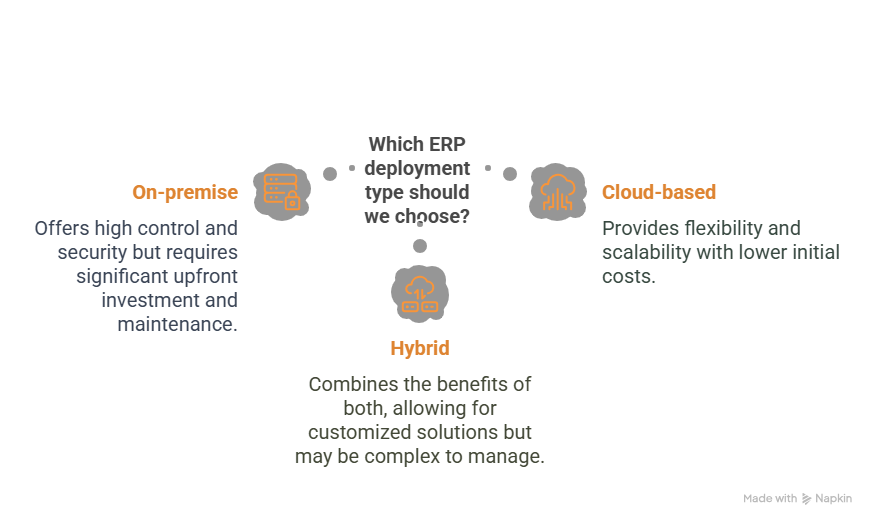
Types of ERP Deployment
Choosing the right ERP deployment type is crucial for trading companies. It affects everything from cost and setup to flexibility and control. There are mainly three types of ERP deployments: On-premise, Cloud-based, and Hybrid. Each has its advantages and depends on the specific needs and size of the business.
1. On-Premise ERP
This type is installed locally on the company’s servers and maintained by in-house IT staff. It offers full control over data and system configuration.
Pros:
- High level of customization
- Greater control over data security
- No dependency on internet availability
Cons:
- Higher upfront costs
- Requires technical staff to manage updates and maintenance
- Slower to scale for new locations
2. Cloud-Based ERP
Hosted on external servers and accessed via the internet, cloud ERP is becoming popular among trading companies due to its lower setup costs and ease of access.
Pros:
- Lower initial investment
- Accessible from anywhere with internet
- The vendor handles maintenance and updates
Cons:
- Ongoing subscription cost
- Less control over system customization
- Depends on internet connectivity
Some most demanding Cloud based ERP Softwares are:
Oracle NetSuite
SAP Business ByDesign
SAP S/4HANA Cloud
Microsoft Dynamics 365
Odoo
Zoho One (ERP Suite)
Acumatica
Sage Intacct
ERPNext
Infor CloudSuite
3. Hybrid ERP
Combines both on-premise and cloud elements. Some parts of the system may run locally, while others use the cloud for more flexibility.
- Balanced control and flexibility
- Ideal for companies with mixed operational needs
- Useful when transitioning from legacy systems
- More complex to manage
- Can be costly if not planned well
For trading companies, cloud ERP is often preferred, especially for businesses with multiple branches or remote teams. It enables real-time updates across all locations and simplifies coordination.
The choice of deployment depends on your budget, IT capabilities, data sensitivity, and plans. What’s important is ensuring that the ERP solution aligns with your business goals and can scale as you grow.
What are the difference between ERP for Manufacturing and ERP for Trading
Enterprise Resource Planning (ERP) systems are tailored to meet the unique operational needs of different types of businesses. While both trading and manufacturing businesses rely on ERP solutions to streamline operations, their core functions and processes differ significantly. Trading businesses focus primarily on procuring and selling goods, requiring strong inventory and supply chain management features. In contrast, manufacturing businesses deal with the production of goods, requiring more complex modules for production planning, material management, and process control. The table below highlights the key differences between ERP systems designed for trading and those built for manufacturing.
| Aspect | ERP for Trading Business | ERP for Manufacturing Business |
|---|---|---|
| Primary Focus | Inventory buying and selling | Product creation, resource planning, and production processes |
| Key Modules | Inventory, Sales, Purchase, CRM, Finance, Logistics | BOM, Work Orders, MRP, Production Planning, Inventory, Finance |
| Inventory Management | Simple stock tracking, reordering | Complex inventory including raw materials, WIP, finished goods |
| Bill of Materials (BOM) | Not typically required | Essential for defining product structure |
| Production Planning | Not needed | Critical module (scheduling, capacity planning) |
| Material Requirement Planning (MRP) | Not needed | Core feature to manage procurement and production timelines |
| Order Fulfillment | Sales order processing, drop shipping | Requires coordination with production before delivery |
| Procurement | Mostly finished goods | Raw materials and indirect materials |
| Costing | Based on item purchase and handling costs | Includes labor, overhead, raw materials, machine time |
| Workflow Complexity | Low to medium | High (multi-stage production, quality checks, routing) |
| Use of Resources (Machines, Labor) | Minimal | Intensive (machine and labor scheduling, downtime tracking) |
| Quality Management | Basic (mostly supplier evaluation) | Advanced (in-process and final product quality control) |
| Typical Users | Wholesalers, Distributors, Retailers | Factories, OEMs, Contract Manufacturers |
Key Benefits of ERP software for trading company
Implementing an ERP system in a trading company isn’t just about automation—it brings real, measurable improvements to daily operations. The benefits go beyond just saving time. They help businesses become more responsive, efficient, and profitable.
Here are some of the key benefits:
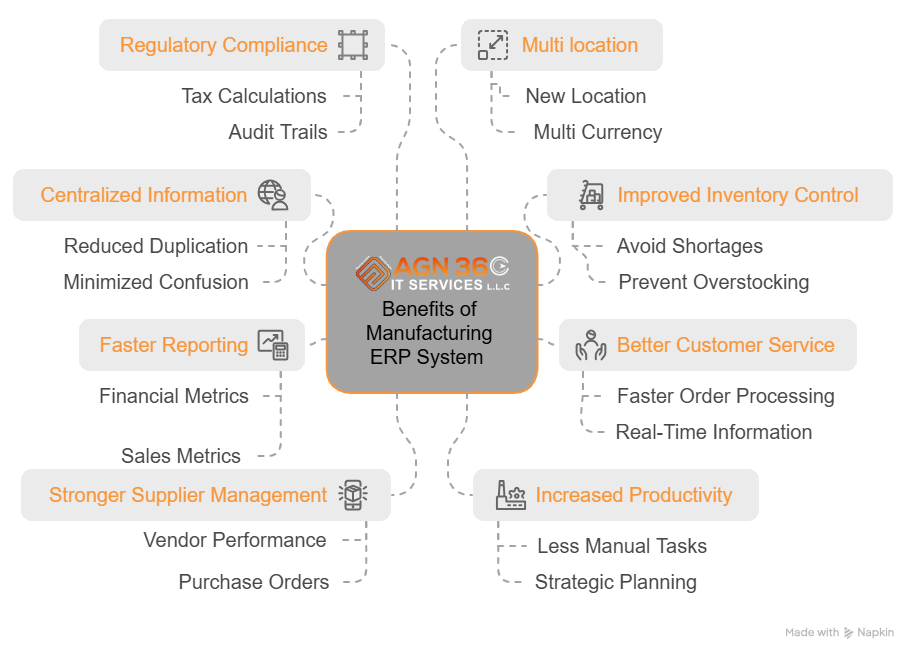
Centralized Information: All departments work from the same database, reducing duplication and confusion.
Improved Inventory Control: Accurate stock levels and alerts help avoid shortages and overstocking.
- Better Customer Service: Faster order processing and access to real-time
Information enhances customer satisfaction.
Faster Reporting: Instant access to financials, sales, and performance metrics speeds up decision-making.
Stronger Supplier Management: Better tracking of vendor performance, purchase orders, and delivery timelines.
Increased Productivity: Less time spent on manual tasks, more time for strategic planning.
Regulatory Compliance: Built-in tools for tax calculations, audit trails, and reporting keep the business compliant.
Scalability: ERP systems can grow with the business, adding new users, features, or branches with ease.
ERP helps trading businesses move from reactive to proactive—anticipating challenges instead of just reacting to them. It allows businesses to streamline operations, reduce errors, and stay ahead of competitors.
By giving real-time visibility into every aspect of the business, ERP empowers leaders to make smarter decisions and manage growth without losing control.
How Do I Know If I’m Ready for an ERP System?
Deciding when to invest in an ERP system is a major decision for any trading business. It’s not just about budget—it’s about recognizing when your current tools are holding you back.
Here are signs that your business may be ready for ERP:
Relying on too many spreadsheets: If most of your data lives in Excel, and it’s hard to keep everything updated, it’s time to consider ERP.
Difficulty tracking inventory: Frequent stock mismatches or lost items point to the need for a better system.
Slow order processing: Delays in sales, delivery, or invoicing show that your processes need automation.
Lack of integration: If different departments use separate systems that don’t talk to each other, ERP can connect them.
Limited reporting capabilities: If it takes hours or days to generate financial or sales reports, ERP can offer real-time insights.
ERP isn’t just for large enterprises. Many small to mid-sized trading companies successfully implement ERP and see returns within months. The key is choosing the right ERP based on your needs, not just going with the most popular or expensive option.
When the costs of errors, delays, and missed opportunities outweigh the cost of ERP, that’s when you know you’re ready to make the move.
Choosing the Right ERP for a Trading Business
Selecting the right ERP software for trading company is just as important as deciding to get one. Every trading business is different—some deal in wholesale, others in retail or international trade. The key is to choose an ERP that matches the way your business operates and can grow with it.
Here are some things to look for when choosing ERP software for a trading company:
1. Industry-Specific Features
Not all ERP systems are built for trading. Look for one that includes modules like sales order processing, inventory control, procurement, finance, and multi-location management. It should support common trading needs like:
Managing purchase and sales orders
Handling supplier and customer data
Tracking inventory across multiple warehouses
Managing import/export regulations and taxes
2. Ease of Use
The system should be simple enough for employees to use daily without constant training. A clean interface and intuitive dashboard can save hours of work and reduce errors.
3. Integration Capabilities
Your ERP should be able to connect with other tools you use, like e-commerce platforms, payment gateways, shipping services, or CRM systems. Seamless integration means less manual work.
4. Scalability and Flexibility
As your business grows, your ERP should grow too. Whether you’re adding more users, opening a new location, or expanding product lines, the ERP should adapt without requiring a complete overhaul.
5. Vendor Support and Updates
Reliable support is essential. Choose a vendor that offers training, troubleshooting, regular updates, and ongoing customer service. This ensures your ERP remains secure and effective over time.
6. Budget and Total Cost of Ownership
Consider not only the initial cost but also the cost of updates, support, and additional features in the future. Cloud-based ERP software for trading company often have a monthly fee, while on-premise solutions might require a one-time payment and maintenance fees.
A proper ERP can transform how a trading business runs, from improving daily operations to offering better customer experiences. The right choice is one that fits your current needs while being prepared for future demands.
Frequently Asked Questions (FAQs)
ERP connects all core trading activities like sales, stock, purchases, and finance in one system. It helps streamline operations, reduce manual errors, and improve efficiency.
Yes, many modern ERP systems are designed for small and mid-sized businesses. Cloud ERP options offer affordable monthly plans with essential features tailored for trading.
Implementation time varies. For small businesses, it may take a few weeks. For larger companies with custom requirements, it can take several months. Proper planning and training help speed up the process.
Yes. A good ERP for trading supports multiple currencies, tax systems, and languages. It simplifies international transactions and helps comply with global trade rules
Accounting software handles only financial tasks. ERP includes accounting but also covers sales, inventory, procurement, and supply chain—all integrated in one system.
Saeeda Riaz
Partner at AGN IT Services LLC | Strategic IT Partner of 10+ Enterprises
Saeeda Riaz is a seasoned IT consultant with over 23 years of experience in delivering innovative technology solutions to businesses across various industries. As the driving force behind a leading IT solutions company, she specializes in digital transformation, business automation, and software development. Her strategic vision and hands-on expertise help organizations streamline operations, enhance efficiency, and stay ahead in the digital landscape.
Connect on LinkedInContact us for IT Solutions
Categories
Grow Your Business Today
Lorem ipsum dolor sit amet, consectetur adipiscing elit, sed do eiusmod tempor incididunt ut labore et dolore
 English